I have always been searching for new editors and have been a fan of VIM, though i was not using it very often. I have used it for editing Ruby and Java with features like intellisense, which is available from version 7.0. But now i feel that its also very easy to customize and beautify the editor to your needs.
I tried a new color scheme and font for VIM 7.0 from this site: http://iamphet.nm.ru/vim/index.html
Then i setup the default look of the editor by editing the "Startup Settings" in the Edit menu.
1
2 set nocompatible
3 source $VIMRUNTIME/vimrc_example.vim
4 source $VIMRUNTIME/mswin.vim
5 behave mswin
6 set nobackup
7 set nu!
8 :colors northsky
9 set guifont=ke9x15
10 set diffexpr=MyDiff()
11 function MyDiff()
12 let opt = ''
13 if &diffopt =~ 'icase' | let opt = opt . '-i ' | endif
14 if &diffopt =~ 'iwhite' | let opt = opt . '-b ' | endif
15 silent execute '\"!e:\Program Files\vim\diff\" -a ' . opt . v:fname_in . ' ' . v:fname_new . ' > ' . v:fname_out
16 endfunction
17
Before that i installed the font kex.fon from the "Fonts" window through control panel.
To customize VIM, the best resource would be VIM user's guide.
Happy Vimming!
Tuesday, December 12, 2006
Vim: The Beauty

Saturday, December 09, 2006
Work around for math:max in XPath 1.0
XPath 1.0 doesn't provide the function max(), but the function last() behaves differently with numerical parameters.
For example:
has nodes with different values. To find the maximum of the values available, we can use the last method as follows:
<?xml version="1.0" encoding="UTF-8"?>
<nodes>
     <node name="1" value ="2"></node>
     <node name="2" value = "3"></node>
     <node name="3" value = "1"></node>
     <node name="4" value = "5"></node>
     <node name="5" value = "4"></node>
</nodes>
The function last() finds the max value of an attribute in a given node-set. This function can be used as a workaround if we are not using XPath 2.0.
<?xml version="1.0" encoding="utf-8"?>
<xsl:stylesheet xmlns:xsl="http://www.w3.org/1999/XSL/Transform" version="1.0">
      <xsl:template match="nodes">
              Max value - <xsl:value-of select="node/@value[last()]"/>
      </xsl:template>
</xsl:stylesheet>
But the last() function is normally used to find the position of the last node.
Sunday, December 03, 2006
Ruby Users Guide
I have uploaded the Ruby Users Guide in CHM format for ease of use. I'll be uploading open source licensed books in CHM format.
Ruby User's Guide
Wednesday, November 29, 2006
Debug Javascripts using Aptana's firefox extension
Aptana is a cool IDE for HTML, JavaScript and CSS with features like content assist,cool documentation,error listings etc. There is much more than just content assist or documentation in aptana. It can debug the client side of your web application.
It uses an extension to talk with firefox's JavaScript engine, which provides all the information about the JavaScript variables, HTML DOM elements,.... anything in the web page.
Debugging a web page
- To debug a web page, use the 'DEBUG' functionality and debug it as "JavaScript Web Application".
- Now you will be prompted for installing a FireFox extension. Click "Install".
- Restart Firefox.
- Again do the first step.
- Now the browser will be started by Aptana. Insert a breakpoint in your web page as shown below.
- Do some action in the browser so that the event is fired and now you will see a debug control in the margin showing the current debugging line.

Now you will be able to see something like this:
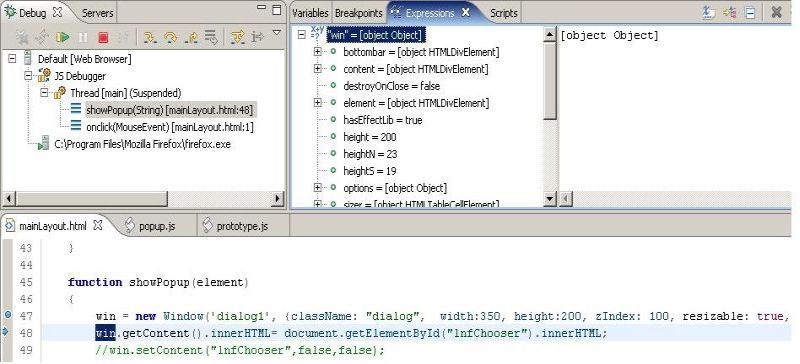
Features :
- Use the mouse pointer to inspect the objects
- Or use the expressions view to add expressions and
- have fun with JavaScript.............................
Wednesday, November 22, 2006
SOAPENC type mappings
The WS client in the previous post cannot handle the SOAPENC type mappings.
To handle types in this namespace, we can make use of the helper class called DefaultSOAPEncodingTypeMappingImpl.
Class cl = DefaultSOAPEncodingTypeMappingImpl
.getSingleton()
.getClassForQName(qname, null, null);
if(cl == null){
cl = DefaultSOAPEncodingTypeMappingImpl
.getSingletonDelegate()
.getClassForQName(qname);
}
And its better to get the parameters for the operation in the correct order as follows:
List inputParts = input.getOrderedParts(null);This returns a list with ordered input parts, so that the input parameters for the invoke() method can be set in perfect order as required.
And one more important thing about WS clients is that when you are writing a client for a web service provided using .Net, the SOAPActionURI property has to be set for it to work properly.
Saturday, November 11, 2006
Webservices using Apache Axis
I'll be giving a simple intro to WS using axis library and it'll contain the following.
- Requirements to startup.
- Writing a simple service that returns simple objects.
- Writing a dynamic client to access a simple service.
- Writing a service that returns a complex type of object(ex: a javabean).
- Generating client for a complex web-service.
Requirements to startup
You need to know what is a web service and little knowledge of it.
You'll need to download the latest(1.4 at present) of Axis library from http://ws.apache.org/axis/ and include it in your classpath.
Change your web.xml as follows to activate the AxisServlet to process the WebService requests:
<?xml version="1.0" encoding="UTF-8"?>
<web-app id="WebApp_ID" version="2.4" xmlns="http://java.sun.com/xml/ns/j2ee"
xmlns:xsi="http://www.w3.org/2001/XMLSchema-instance"
xsi:schemaLocation="http://java.sun.com/xml/ns/j2ee http://java.sun.com/xml/ns/j2ee/web-app_2_4.xsd">
<display-name>
WSExample</display-name>
<servlet>
<display-name>
Apache-Axis Servlet</display-name>
<servlet-name>AxisServlet</servlet-name>
<servlet-class>
org.apache.axis.transport.http.AxisServlet</servlet-class>
</servlet>
<servlet>
<display-name>
Axis Admin Servlet</display-name>
<servlet-name>AdminServlet</servlet-name>
<servlet-class>
org.apache.axis.transport.http.AdminServlet</servlet-class>
<load-on-startup>100</load-on-startup>
</servlet>
<servlet-mapping>
<servlet-name>AxisServlet</servlet-name>
<url-pattern>/servlet/AxisServlet</url-pattern>
</servlet-mapping>
<servlet-mapping>
<servlet-name>AxisServlet</servlet-name>
<url-pattern>*.jws</url-pattern>
</servlet-mapping>
<servlet-mapping>
<servlet-name>AxisServlet</servlet-name>
<url-pattern>/services/*</url-pattern>
</servlet-mapping>
<servlet-mapping>
<servlet-name>AdminServlet</servlet-name>
<url-pattern>/servlet/AdminServlet</url-pattern>
</servlet-mapping>
<welcome-file-list>
<welcome-file>index.html</welcome-file>
<welcome-file>index.htm</welcome-file>
<welcome-file>index.jsp</welcome-file>
<welcome-file>default.html</welcome-file>
<welcome-file>default.htm</welcome-file>
<welcome-file>default.jsp</welcome-file>
</welcome-file-list>
</web-app>
Writing a simple webservice (returning a simple object)
A web service class is a simple class that has some public methods that are going to be accessed.
In this example we will have a class called Teller, which will have a method called getBalance.
The getBalance will take an account number and return the balance for the account. Usually this may not be allowed to called directly, instead WSSecurity can be used to get the username and password to let the user access the getBalance method. But for our example the security part will not be discussed.
class Teller{
Integer getBalance(Integer accountNumber){
//implementation that may access a database or the other banking
//web service to get the details
}
}
The easiest way to deploy a webservice class would be to put the java file into your webapp directory and renaming it to .jws (means java web service). But we will not do this since its very vulnerable to put the source of your service open.
Instead we'll write a Web Service deployment descriptor(WSDD) file to deploy our service.
We can have individual WSDDs for each of our services or a single file called server-conifig.wsdd ,which will be deployed automatically at startup.
<?xml version="1.0" encoding="UTF-8"?>
<deployment xmlns="http://xml.apache.org/axis/wsdd/"
            xmlns:java="http://xml.apache.org/axis/wsdd/providers/java">
<globalConfiguration>
<parameter name="adminPassword" value="admin"/>
<parameter name="attachments.Directory" value="./attachments"/>
<parameter name="attachments.implementation"
             value="org.apache.axis.attachments.AttachmentsImpl"/>
<parameter name="sendXsiTypes" value="true"/>
<parameter name="sendMultiRefs" value="true"/>
<parameter name="sendXMLDeclaration" value="true"/>
<parameter name="axis.sendMinimizedElements" value="true"/>
<requestFlow>
<handler type="java:org.apache.axis.handlers.JWSHandler">
<parameter name="scope" value="session"/>
</handler>
<handler type="java:org.apache.axis.handlers.JWSHandler">
<parameter name="scope" value="request"/>
<parameter name="extension" value=".jwr"/>
</handler>
</requestFlow>
</globalConfiguration>
<handler name="LocalResponder"
          type="java:org.apache.axis.transport.local.LocalResponder"/>
<handler name="URLMapper"
          type="java:org.apache.axis.handlers.http.URLMapper"/>
<handler name="Authenticate"
          type="java:org.apache.axis.handlers.SimpleAuthenticationHandler"/>
<service name="AdminService" provider="java:MSG">
<parameter name="allowedMethods" value="AdminService"/>
<parameter name="enableRemoteAdmin" value="false"/>
<parameter name="className" value="org.apache.axis.utils.Admin"/>
<namespace>http://xml.apache.org/axis/wsdd/</namespace>
</service>
<service name="TellerService" provider="java:RPC">
<parameter name="allowedMethods" value="*"/>
<parameter name="className" value="in.aanand.Teller"/>

</service>
<service name="Version" provider="java:RPC">
<parameter name="allowedMethods" value="getVersion"/>
<parameter name="className" value="org.apache.axis.Version"/>
</service>
<transport name="http">
<requestFlow>
<handler type="URLMapper"/>
<handler type="java:org.apache.axis.handlers.http.HTTPAuthHandler"/>
</requestFlow>
</transport>
<transport name="local">
<responseFlow>
<handler type="LocalResponder"/>
</responseFlow>
</transport>
</deployment>
This is our WSDD file that will deploy the Teller class as a webservice. Now compile the sources and deploy the application to a servlet container like Tomcat or an application server like JBoss.
This will deploy our service and you will be able to access the WSDL from this URL http://localhost[:port]/services/TellerService
The WSDL generated here is the most important content in a webservice since this is the only way you can find information about the webservice deployed and its implemenation independent. That is, WSDL generated by a Java webservice provider and a .Net provider will obey a standard specification by W3C(http://www.w3.org/TR/wsdl).
The client programs use this WSDL content to findout the operations(methods) exposed through the service, the parameters to be passed and the return value of each method.
Writing a dynamic client to access our TellerService
Our client will be a JSP that will take a webservice endpoint like http://localhost[:port]/services/TellerService and will walk you through a wizard to select the operation to execute and specify the required parameters for the operation.
This client will work only for the RPC based(synchronous) services returning simple objects such as String, int, long and so on.
index.jsp
<%@page contentType="text/html"%>The JSP page contains a if-else if block with 4 conditions. Each condition is the step number of the client wizard. The first steps requests for the service end point. The second one finds the operations in the WSDL content obtained through the endpoint URL.
<%@page pageEncoding="UTF-8"%>
<%@ page import="org.apache.axis.client.Call" %>
<%@ page import="org.apache.axis.client.Service" %>
<%@ page import="javax.wsdl.factory.WSDLFactory" %>
<%@ page import="javax.wsdl.xml.WSDLReader" %>
<%@ page import="com.ibm.wsdl.factory.WSDLFactoryImpl" %>
<%@ page import="javax.wsdl.Definition" %>
<%@ page import="javax.xml.namespace.QName" %>
<%@ page import="javax.xml.rpc.encoding.*" %>
<%@ page import="org.apache.axis.encoding.*" %>
<%@ page import="javax.wsdl.*" %>
<%@ page import="java.util.Map" %>
<%@ page import="java.lang.reflect.*" %>
<%@ page import="java.util.List" %>
<%@ page import="java.util.Iterator" %>
<!DOCTYPE HTML PUBLIC "-//W3C//DTD HTML 4.01 Transitional//EN"
"http://www.w3.org/TR/html4/loose.dtd">
<html>
<head>
<meta http-equiv="Content-Type" content="text/html; charset=UTF-8">
<title>Common Web-Service Client</title>
</head>
<body>
<center>
<h1>Common Web-Service Client</h1>
<form action="<%=request.getContextPath()%>/index.jsp">
<%
String wizardStepNo= request.getParameter("step");
WSDLFactory factory = new WSDLFactoryImpl();
WSDLReader reader = factory.newWSDLReader();
Definition wsdlDefinition = null;
if(wizardStepNo == null || "".equals(wizardStepNo.trim())|| "1".equals(wizardStepNo.trim())){
//Display the first step page to get the endpoint
%>
<b>Please enter the web service endpoint URL:</b><br>
<input type="text" name="endpoint" size="50">
<input type="hidden" name="step" value="2">
<input type="submit" value="Next">
<%
}else if("2".equals(wizardStepNo.trim())){
//Display all the methods in the service to choose
try{
String endPoint = request.getParameter("endpoint");
wsdlDefinition = reader.readWSDL(endPoint+"?wsdl");
Map ports = wsdlDefinition.getPortTypes();
Iterator iter = ports.entrySet().iterator();
if(iter.hasNext()){
%><input type="hidden" name="step" value="3">
<input type="hidden" name="endpoint" value="<%=endPoint%>"><%
Map.Entry entry = (Map.Entry)iter.next();
PortType portType = (PortType)entry.getValue();
List operations = portType.getOperations();
Iterator operIter = operations.iterator();
%><select name="operation"><%
while(operIter.hasNext()){
Operation operation = (Operation)operIter.next();
%><option value="<%=operation.getName()%>"><%=operation.getName()%></option><%
}
%></select><br><input type="submit" value="Next">
<input type="button" value="Back"
onclick="javascript:window.location.href='<%=request.getRequestURI()%>?step=1'"><%
}else{
%><b>No Service found</b><br><a href="index.jsp">Start fresh</a><%
}
}catch(Exception e){
%><b>No Service found</b><br><a href="index.jsp">Start fresh</a><%
}
}else if("3".equals(wizardStepNo.trim())){
//Display the form for the selected operation in the service
try{
String endPoint = request.getParameter("endpoint");
wsdlDefinition = reader.readWSDL(endPoint+"?wsdl");
Map ports = wsdlDefinition.getPortTypes();
Iterator iter = ports.entrySet().iterator();
if(iter.hasNext()){
Map.Entry entry = (Map.Entry)iter.next();
PortType portType = (PortType)entry.getValue();
List operations = portType.getOperations();
Iterator operIter = operations.iterator();
Operation selectedOperation = null;
while(operIter.hasNext()){
Operation operation = (Operation)operIter.next();
if(operation.getName().equalsIgnoreCase(request.getParameter("operation"))){
selectedOperation = operation;
break;
}
}
if(selectedOperation!= null) {
Message input = selectedOperation.getInput().getMessage();
Map inputParts = input.getParts();
Object inputParams[] = new Object[inputParts.size()];
Iterator partIter = inputParts.entrySet().iterator();
%><u>Parameters</u><br><%
while(partIter.hasNext()){
Part part = (Part)((Map.Entry)partIter.next()).getValue();
QName qname = part.getTypeName();
if(qname != null)
{
String namespace = qname.getNamespaceURI();
if(!namespace.equals("http://www.w3.org/2001/XMLSchema")) {
throw new WSDLException(
WSDLException.OTHER_ERROR,"Namespace unrecognized");
}
String localPart = qname.getLocalPart();
javax.xml.namespace.QName wsdlQName =
new javax.xml.namespace.QName(namespace,localPart);
Class cl = DefaultTypeMappingImpl.getSingletonDelegate().getClassForQName(wsdlQName);
// if the Java type is a primitive, we need to wrap it in an object
if(cl.isPrimitive()) {
if(cl.equals(int.class)){
cl = Integer.class;
}else if(cl.equals(long.class)) {
cl = Long.class;
}else if(cl.equals(float.class)) {
cl = Float.class;
}else if(cl.equals(double.class)) {
cl = Double.class;
}else if(cl.equals(boolean.class)) {
cl = Boolean.class;
}else if(cl.equals(char.class)) {
cl = Character.class;
}
}
%><%=part.getName()%>(<%=cl.getName()%>) -
<input type="text" name="<%=part.getName()%>"><br><%
}
}
}
%></select><%
}else{
%><b>No Service found</b><br><a href="index.jsp">Start fresh</a><%
}
%>
<br><input type="hidden" name="endpoint" value="<%=endPoint%>">
<input type="hidden" name="operation" value="<%=request.getParameter("operation")%>">
<input type="hidden" name="step" value="4">
<input type="submit" value="Next">
<input type="button" value="Back"
onclick="javascript:window.location.href='<%=request.getRequestURI()%>?step=2'">
<%
}catch(Exception e){
e.printStackTrace();
%><b>No Service found</b><br><a href="index.jsp">Start fresh</a><%
}
}else if("4".equals(wizardStepNo.trim())){
//Invoke the service and display the result for the invoked service operation
try{
String endPoint = request.getParameter("endpoint");
wsdlDefinition = reader.readWSDL(endPoint+"?wsdl");
Map ports = wsdlDefinition.getPortTypes();
Iterator iter = ports.entrySet().iterator();
if(iter.hasNext()){
Map.Entry entry = (Map.Entry)iter.next();
PortType portType = (PortType)entry.getValue();
List operations = portType.getOperations();
Iterator operIter = operations.iterator();
Operation selectedOperation = null;
while(operIter.hasNext()){
Operation operation = (Operation)operIter.next();
if(operation.getName().equalsIgnoreCase(request.getParameter("operation"))){
selectedOperation = operation;
break;
}
}
if(selectedOperation!= null) {
Message input = selectedOperation.getInput().getMessage();
Map inputParts = input.getParts();
Object inputParams[] = new Object[inputParts.size()];
int i =0;
Iterator partIter = inputParts.entrySet().iterator();
%><u>Parameters</u><br><%
while(partIter.hasNext()){
Part part = (Part)((Map.Entry)partIter.next()).getValue();
QName qname = part.getTypeName();
if(qname != null)
{
String namespace = qname.getNamespaceURI();
if(!namespace.equals("http://www.w3.org/2001/XMLSchema")) {
throw new WSDLException(
WSDLException.OTHER_ERROR,"Namespace unrecognized");
}
String localPart = qname.getLocalPart();
javax.xml.namespace.QName wsdlQName =
new javax.xml.namespace.QName(namespace,localPart);
Class cl = DefaultTypeMappingImpl.getSingletonDelegate().getClassForQName(wsdlQName);
// if the Java type is a primitive, we need to wrap it in an object
if(cl.isPrimitive()) {
if(cl.equals(int.class)){
cl = Integer.class;
}else if(cl.equals(long.class)) {
cl = Long.class;
}else if(cl.equals(float.class)) {
cl = Float.class;
}else if(cl.equals(double.class)) {
cl = Double.class;
}else if(cl.equals(boolean.class)) {
cl = Boolean.class;
}else if(cl.equals(char.class)) {
cl = Character.class;
}
}
try {
Constructor cstr = cl.getConstructor(
new Class[] { Class.forName("java.lang.String") });
inputParams[i] = cstr.newInstance(
new Object [] { request.getParameter(part.getName()) });
} catch(Exception e) {
e.printStackTrace();
}
i++;
}
}
Service service = new Service();
Call call = (Call) service.createCall();
call.setTargetEndpointAddress( new java.net.URL(endPoint) );
call.setOperation(portType.getQName(), selectedOperation.getName());
Object ret = call.invoke( inputParams );
%>Value returned -- <%=ret.toString()%><%
}
%><br><input type="button" value="Back"
onclick="javascript:window.location.href='<%=request.getRequestURI()%>?step=1'"><%
}else{
%><b>No Service found</b><br><a href="index.jsp">Start fresh</a><%
}
}catch(Exception e){
%><b>No Service found</b><br><a href="index.jsp">Start fresh</a><%
}
}
%>
</form>
</center>
</body>
</html>
The third step finds all the parametes required for the operation and requests for the same.
The final step invokes the service method with the given parameter values and prints the return value.
Step 2: Here an instance of WSDLReader is created and all the portTypes in the document are obtained. PortType is an element in the WSDL that contains details of the operations in the service. All the operations in the WSDL are displayed to the user to select.
Step 3: In this step we find the operation and the input Message for the selected operation name. And then we find the parts (the parameters in this case) to the operation and show a form to the user to fill the parameters. (QName is made of namespace and a local part, namespace -> package and local part -> class or method name)
Step 4: The selected operation is invoked with the parameter values filled by the user. And the return value is printed.
A web service with complex datatypes
Now we'll see how to deploy a service that contains complex parameters and return values such as a bean. You may know that all the calls made through SOAP are encoded into SOAP envelops (XML). To encode the data sent the webservice implementation requires a serializer and a deserializer for every data type. Most of the WS implementations support primitive serializers and deserializers for simple data types.
But for a user defined data type like a bean, we need to provide the serializer and deserializer to use the data type in the WS calls.
For example, lets add one more method thats going to return the details of the person logged in. And this is going to be a bean called AccountHolder.
package in.aanand;

public class Teller {
public Teller() {

}

public Integer getBalance(Integer accountNumber){
        int balance = 0;
        //get the balance
        return new Integer(balance);
}

public AccountHolder getAccountHolder(Interger accountNumber)
{
        return accountHolder;
}
}
For this bean to be serialized we need to specify a serializer factory class and a deserializer factory class in our WSDD. The tag used to specify this is typeMapping.
class AccountHolder{
  private int userId;
  private String name;
    private String address;

AccountHolder(){

}
    //getters and setters

}
Reference : http://www.oio.de/axis-wsdd/
<typeMapping xmlns:ns="http://aanand.in"
                 qname="ns:AccountHolder"
                 type="java:in.aanand.AccountHolder"
                 serializer="org.apache.axis.encoding.ser.BeanSerializerFactory"
                 deserializer="org.apache.axis.encoding.ser.BeanDeserializerFactory"
                 encodingStyle="http://schemas.xmlsoap.org/soap/encoding/"
    />
This tells axis servlet to use this serializer and deserializer while handling AccountHolder data type. Here we have used BeanSerializer and BeanDeserializer which are provided by axis itself
(All the WS implementations may not have this). We can also write custom serializers and deserializers for more complex types, but they are going to be discussed here.
Now deploying this service and accessing it through our JSP client will produce an exception saying that "no deserializer found for (http://aanand.in)AccountHolder". This is expected, bcoz we dint specify a deserializer at the client side.
Note: while returning array or collection you may have to register an arrayMapping for it to work properly
Generating client for a complex web-service
Instead of accessing this service using the dynamic client, we'll generate the stubs and skeleton to access the endpoint. There is a utility called WSDL2Java in the axis library which will produce the client based on the WSDL document.
usage : WSDL2Java http://localhost[:port]/services/TellerService?wsdl
This will produce four files plus a bean class called AccountHolder.
Now you can use the TellerServiceSoapBindingStub class to access the service.
TellerServiceSoapBindingStub stub= new TellerServiceSoapBindingStub ();
AccountHolder accountHolder = stub.getAccountHolder(accountNumber);
Now you will find that the accountHolder object is returned to the client by deserializing it with BeanDeserializer.
You can also use the dyanmic way of calling a web service but you will have to register the complex datatypes manually.